The only real self-learning AI intelligent document processing model on Earth

capture
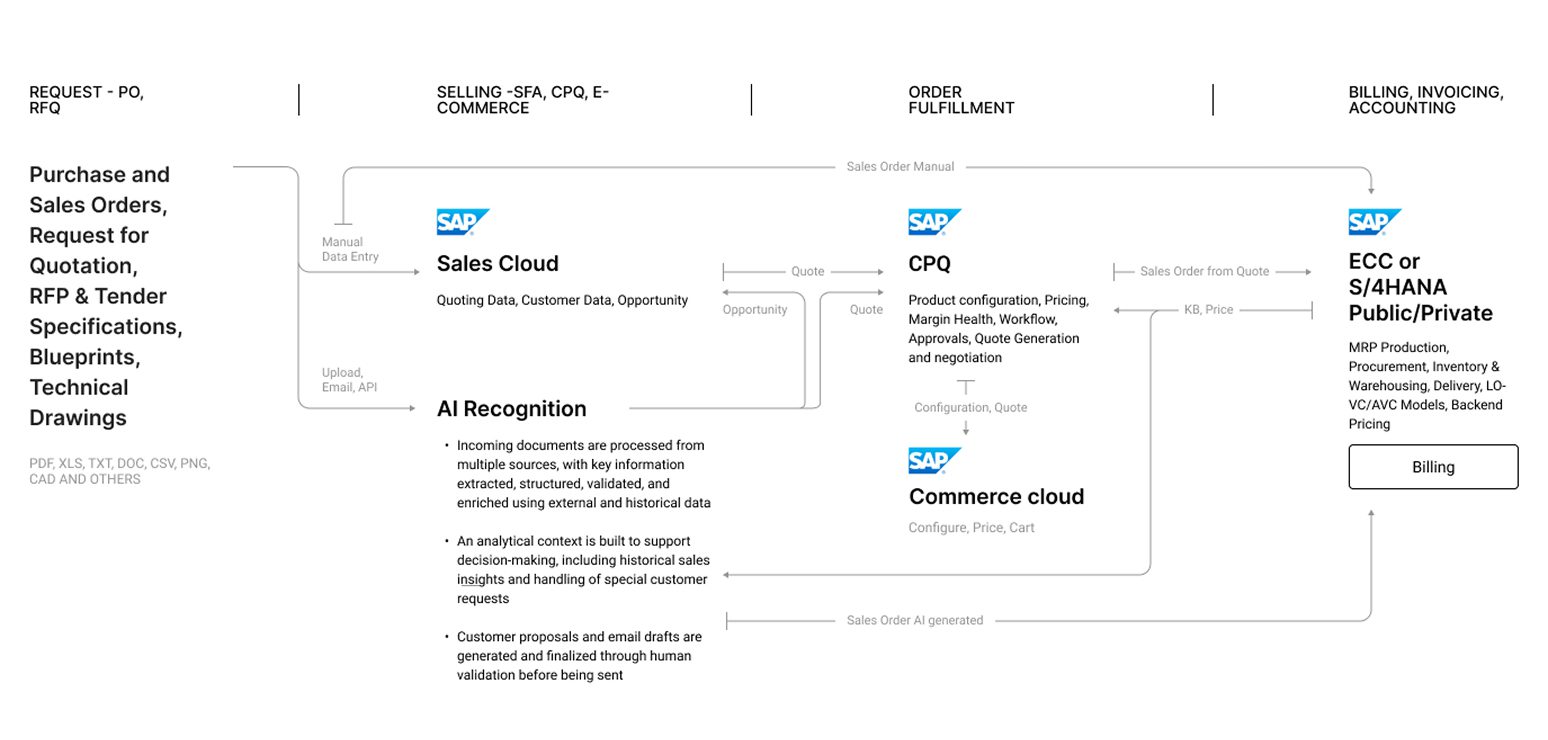
Structured, Semi-Structured, Unstructured
PDF, XLS, TXT, CSV, DOC, PNG, CAD, 1010101 and others
Uploaded File, Received by Mail, Captured via API
Processing
Capture, Classification
Extraction, Validation, Enrichment
Verification, Integration, Insights
Activation
With API-first approach Graip.AI powers your apps with document recognition capability
Graip.AI creates files in any business formats and technical documents like JSON or XML
ERP, CRM, CPQ, Variant Configuration, Logistics, Procurement, other systems
Document capture
Efficiently gather a diverse range of documents from various sources, whether they are physical papers, images, or digital files. Our platform ensures seamless and secure data acquisition, providing a solid foundation for the subsequent stages of processing.
- Plug & Play Use-Cases
Our platform offers a collection of pre-developed processes designed to recognize and process common document types (e.g. sales orders, invoices, product configurations, onboarding documents, transportation documents). With built-in document recognition algorithms and automated data extraction capabilities, you simplify your operations. Plug & Play use-cases save time in model training and document quantity needed for machine learning process.
- Page Splitting
The Page Splitting feature lets you upload a document and choose only the pages you want to analyze, ensuring you only pay for the content you actually process. Graip.AI intelligently focuses on the selected pages, extracting key data points and presenting them for further analysis or export. This focused approach not only improves your workflow but also reduces the time and resources spent dealing with unnecessary information.
- Document Auto-Rotation
Graip.AI’s Document Auto-Rotation feature automatically detects and corrects misaligned documents, whether they are slightly off-center or fully rotated by 90 or 180 degrees. Using advanced AI image processing, the system ensures that every document is correctly oriented for precise data extraction and smooth processing, eliminating the need for manual adjustments.
- Annotation Tool
With Graip.AI's Annotation Tool, business users can create custom document processing models without needing IT expertise. This intuitive tool lets you highlight specific data points directly on your documents, connecting key-value pairs with just a few clicks. Graip.AI's AI engine then learns these relationships, adapting to your unique needs. This simple, user-friendly approach eliminates complex configurations, making it easy to train highly accurate models tailored to your documents. As you process more documents, the system continues to learn and improve, ensuring you get reliable data extraction every time.
- Cellphone Photos Upload
Graip.AI offers more flexibility for uploading documents. Along with drag-and-drop, API integration, and shared storage access, our platform offers a mobile-friendly interface that allows you to upload documents directly from your smartphone camera. This feature is especially beneficial for mobile workers, like drivers needing to upload bills of lading while on the move, helping to optimize operations and improve efficiency.
- Zip Upload
Our Zip Upload feature increases workflow efficiency by allowing you to upload and process multiple documents at once using a compressed Zip file. This bulk processing capability lets you handle hundreds or even thousands of documents in one go, saving time and boosting productivity by reducing the need for individual uploads.
- Ready-to-use Docs Library
Graip.AI makes document processing easy with a comprehensive Ready-to-use library of pre-configured templates. Featuring over 25 predefined field sets for common documents — such as invoices, bank statements, and utility bills — our templates guide the AI to quickly and accurately extract key data. Select a template, upload your document, and let the system retrieve the information. You can also customize existing fields or create entirely new templates to meet your unique business needs, giving you faster access to critical insights and simplifying document management.
- Email Recognition
Graip.AI's Email Recognition feature allows you to extract and process data directly from email body texts using advanced language models (LLMs). Our platform intelligently identifies relevant information from incoming emails, enabling you to automate data retrieval and seamlessly integrate it into your business systems. Whether capturing key details, populating forms, or creating new documents, this feature transforms unstructured email content into actionable data, making your workflows more efficient.
- Multi language
Graip.AI's Multi-Language feature supports data extraction and analysis in over 141 languages, allowing the platform to work effectively across different global markets. The advanced language module automatically detects the language of a document and processes it accurately, extracting key information regardless of the language used. Additionally, the user interface is available in English, French, Italian, and German, making it easy for users around the world to manage documents seamlessly.
- User Groups
Take control of your document workflows with User Groups by organizing your team or department into distinct units, each with dedicated documents and users. Define automated workflows Flows) for specific document types to make data extraction and processing more efficient. With Graip.AI's intuitive platform, you can manage user access and permissions, monitor document status, and optimize how your team works together, ensuring everyone has the tools they need to succeed.
- Reduction
Reduction feature helps protect sensitive data through advanced anonymization. It automatically identifies and redacts personal information, such as names, addresses, and financial details, while keeping the rest of the document intact. This ensures that important data remains accessible without compromising privacy. By effectively reducing sensitive information, Graip.AI supports compliance with privacy regulations while preserving the structure and usability of your documents.
Intelligent processing
Power of advanced AI algorithms allows you to automatically extract relevant data from the captured documents. Our intelligent processing ensures 100%-accurate extraction, interpretation of information and data understanding.
- Active Learning
Active Learning allows our IDP solution to quickly adapt to new document templates without manual effort. As your business deals with new document formats, the system learns from each interaction, automatically making the necessary adjustments. Each time a new template is processed, Active Learning improves its understanding of different data fields, which leads to greater accuracy over time.
- Natural Language Prompts
Graip.AI takes document processing to the next level with user-defined prompts. You can fine-tune the extraction process simply by telling the system what specific data you need (using Natural Language Prompts). Graip.AI learns from your instructions and automatically identifies and extracts the information you specify. This means you can easily adapt the platform to meet your exact business requirements, capturing all the critical details you need without being limited by pre-defined models.
- Text-to-Columns
Graip.AI makes it easy to extract valuable insights from text-heavy documents. Our advanced algorithms intelligently analyze your content, identify key information, and organize it into clear, usable columns. This Text-to-Columns feature simplifies tasks like parsing product specifications or generating quotes, transforming complex data into actionable insights that you can use right away.
- Document Classification
Document Classification feature automates the sorting and routing of your documents, simplifying document management. You can upload a batch of documents in any format, and Graip.AI's advanced AI models will analyze the content, categorize them, and direct each document to the appropriate workflow for further processing. Relevant information is extracted automatically, eliminating the need for manual sorting, reducing errors, and making data processing more efficient.
- Excel Processing
Excel Processing feature allows you to handle and extract data from Excel spreadsheets, even when they are semi-structured or complex. The platform reads the data within these files, identifies patterns, and converts it into an organized, consistent format. This includes extracting key values, understanding relationships between data points, and restructuring the content for better usability. Once processed, the cleaned data can be used for analysis, integrated into other systems, or used to trigger automated workflows, making Excel data handling both efficient and actionable.
- Boolean Data Recognition
Graip.AI’s Boolean Data Recognition feature accurately identifies and extracts Yes/No answers or checkmarks from documents, converting them into true or false values. This automated conversion simplifies the processing and analysis of boolean data, making it easier to work with structured digital formats.
- Validation Rules Builder
Graip.AI’s Validation Rules Builder allows users to create custom rules to verify the accuracy of extracted information, ensuring data quality. Set up validation rules for each field through a user-friendly interface, with instant notifications for failed validations. Use pre-built rules to automatically verify details like emails, IBANs, phone numbers, VAT numbers, and currency codes, or create your own custom rules to meet specific business requirements. This helps detect errors such as missing data, incorrect formats, or mismatched values, improving data consistency and operational efficiency.
- Image Content Recognition
Graip.AI’s Image Content Recognition feature extends document processing by accurately identifying and categorizing visual content. The platform can recognize different types of images — such as human photos, product images, or scenic photos — and classify them accordingly. This capability allows you to sort, filter, and extract valuable data from images efficiently. For example, when processing human photos, Graip.AI can estimate age group and gender, providing additional insights.
- ML Models Suite
Our IDP solution offers a range of Machine Learning Models to address different customer needs. Whether you are handling various document types or have specific data processing requirements, our suite lets you choose the models that best fit your specific requirements and goals, ensuring a tailored solution for your operations.
Data activation
Transform the extracted data into actionable insights and information. Activate the data by integrating it into your existing systems, applications, or processes. This final stage empowers informed decision-making, enhanced productivity, and improved operational efficiency.
- Plug & Play Integration
Our Plug & Play Integration capabilities provide a seamless connection between Graip.AI and your existing business software. With our API, you can easily integrate our platform with software applications, enabling smooth data synchronization and straightforward workflows. Additionally, we offer native integration with market-leading ERPs, ensuring compatibility and simplifying data management across systems. Additionally, Graip.AI works seamlessly as an extension to leading RPA solutions, so you can take advantage of our AI capabilities without having to replace your existing RPA tools.
- Product Validation & Mapping
Graip.AI automates the extraction, validation, and matching of product data from incoming documents with your internal systems. It intelligently breaks down unstructured product descriptions into structured data and checks if everything matches your configuration requirements. Using advanced matching algorithms, Graip.AI aligns product descriptions from different vendors with your records (even when they use different terminology), helping to prevent costly mismatches that could delay order fulfillment. If there are discrepancies, the system flags them for review, ensuring all data is accurate before moving forward.
- Activity Tracking
Our Activity Tracking feature provides a comprehensive monitoring system that captures a detailed log of all system activities: changes to accounts, workflows, version updates, and even adjustments to prompts, headers, or item extraction fields. This allows you to trace and analyze individual user actions, with the ability to generate detailed reports for compliance and auditing purposes. Stay up to date on system events and changes through real-time monitoring, ensuring traceability, accountability, and a reliable record of all operations.
- Multi-Stage Approvals
Graip.AI's Multi-Stage Approval workflow optimizes decision-making and accountability. You can create custom approval chains, assign specific approvers, and set up automated email notifications — all designed to make document processing smoother and reduce errors. With precise control over each approval stage, including the ability to restrict document access, Graip.AI ensures that only authorized personnel can make key decisions. This approach not only helps maintain compliance but also improves efficiency across your operations.
- Smart Workflows
Smart Workflows feature lets business users design and customize workflows effortlessly, without needing to modify any code. With a simple drag-and-drop interface, you can easily capture specific data, determine where it should go in your system, and trigger automated actions based on the information extracted. By setting up pre- or post-processing rules, you can tailor workflows to fit your exact business needs, simplifying complex data processing and ensuring efficient, reliable outcomes.
- Missing Data Alert
Graip.AI's Missing Data Alert feature ensures that no critical information is left out by automatically sending email requests for missing data to the appropriate contacts. If required data is missing from provided documents, the platform can either automatically reach out or allow you to send a request manually with the click of a button. Personalized emails are sent to clients, partners, or vendors to gather the needed information, ensuring all necessary details are gathered on time. You can engage directly with document senders without relying on an external email client, and any received data is grouped and organized for easy access.
- Units Configurator
Graip.AI’s Units Configurator feature helps manage different formats for currency, dates, and times across multiple regions. Using post-processing rules, you can easily configure these formats within each workflow. For currency, the system automatically extracts the currency code, ensuring financial data is accurately processed according to regional requirements. For dates and times, the feature converts all information to the correct local format, maintaining consistency. This allows you to accommodate regional differences seamlessly, eliminating format mismatches and enhancing global operations.
- Configurable Output
The Configurable Output feature allows you to define and extract specific pieces of data from your documents, beyond the built-in extraction capabilities. With options like key-value extraction, intelligent matching, and result mapping, Configurable Output gives you the flexibility to tailor the platform to your exact needs, ensuring the data you collect is exactly what your business requires.
- Text search
The Text Search feature improves document navigation by allowing you to filter based on specific content, including headers and line items. Unlike traditional search tools that can return irrelevant results, Graip.AI enables precise retrieval by criteria such as customer names or product details. This targeted search ensures you can quickly access the information you need, significantly boosting efficiency and productivity.
- Labels
Easily organize and categorize your documents by applying descriptive Labels directly within the platform. With our user-friendly interface, you can quickly create and assign labels, making it simpler to navigate and retrieve documents. This feature enhances collaboration, improves search functionality, and streamlines overall document management.
- Advanced Data Processing
Graip.AI's Advanced Data Processing capabilities ensure your data is accurate and consistent. Automatically convert extracted values into specific formats, units, or categories, eliminating typos and inconsistencies to create clean, reliable datasets. With features like calculations, validations, and mapping, you can fine-tune your data to perfectly align with your business needs, ensuring precision and reliability in every step.
- Intelligent Reporting
Graip.AI’s Intelligent Reporting provides you with intuitive dashboards and in-depth data analysis capabilities. The platform visualizes data in real-time, allowing you to easily navigate and interact with the information. You can use the interactive dashboards to explore data trends, perform deep dives into specific metrics, and generate detailed reports. The advanced analytics tools help turn raw data into actionable insights, making it simple to track key performance metrics and identify areas for growth and optimization.
- Smart Data Retention
Graip.AI’s Smart Data Retention feature provides granular control over how long data is kept and when it is deleted. You can define retention periods for your processed requests, after which the platform will automatically archive or delete the data based on your specifications. This helps ensure compliance with data privacy regulations, optimizes storage costs, and gives you complete control over your data lifecycle.
- Changes Tracking
Changes Tracking feature keeps a record of all modifications made to your data. Each change automatically generates a new version, maintaining a full audit trail. This allows you to track changes, compare versions, and revert to earlier states if needed. Additionally, you can use these changes to train the model, improving its accuracy over time.
- Many-to-one
Graip.AI's Many-to-one feature consolidates information from multiple documents into a single, unified structure. For example, it gathers data from documents like proof of income, identity verification and other collateral documents into one profile for loan processing. This reduces manual entry, ensuring efficient data merging and faster processing.
- Advanced Data Matching
Graip.AI's Advanced Data Matching feature ensures data accuracy and consistency by comparing extracted information against both internal and external databases. Using advanced machine learning models, the platform validates customer data, product details, and other critical information against your ERP system or internal records, effectively eliminating errors and inconsistencies.
- One-to-many
The one-to-Many feature in Graip.AI allows a single document to be divided into multiple outputs based on predefined rules. The platform uses custom logic to split a complex document into distinct files, with each output tailored for different entities or purposes. For instance, when processing invoices, Graip.AI can break down a complex invoice into individual segments that match specific customer or business requirements. This is achieved by applying document segmentation rules, which extract and reformat the relevant data into separate, actionable outputs. Additionally, the feature supports integration with external systems like CRMs and ERPs, allowing seamless distribution of the segmented documents.
- 2-Way Matching
Graip.AI's 2-Way Matching feature ensures consistency by comparing related data across interconnected documents, such as matching product details between purchase orders and invoices. The platform uses advanced matching logic to automatically identify and compare relevant data points, allowing you to configure which fields to match based on your specific needs. You can visualize the comparison results to easily validate accuracy, and matched entities are preserved as independent records to maintain integrity, even if the source documents change. The matched data can also be exported in formats like Excel or JSON, making it simple to integrate with external systems or applications for further processing or analysis.
Graip.AI Architecture

Platform integrations

How to get
started
Got questions?